
How to pull your Substack podcast data into BigQuery
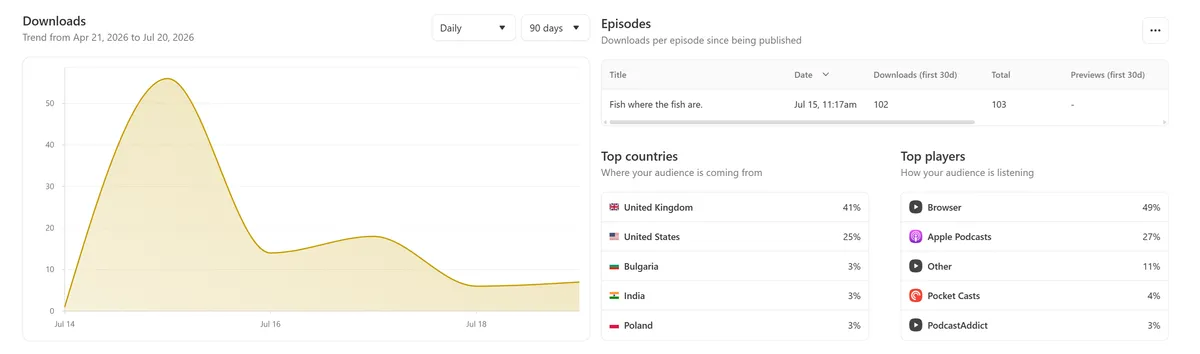
Substack shows you lovely podcast dashboards - and gives you no way to have the numbers behind them. So here's how to reverse-engineer its private API and pipe your own data into BigQuery, refreshing itself every six hours. I've packaged the whole build so you can point Claude at it and follow along.
The problem
Substack's podcast stats page is okay to look at, but it's only visible to me, and only when logged in. So if I wanted to share data about my podcast with you, or even my co-host Bhav, I need to get the data out of the dashboard and into my own data ecosystem.
Update: I did in fact use this data to build a live dashboard which you can see here!
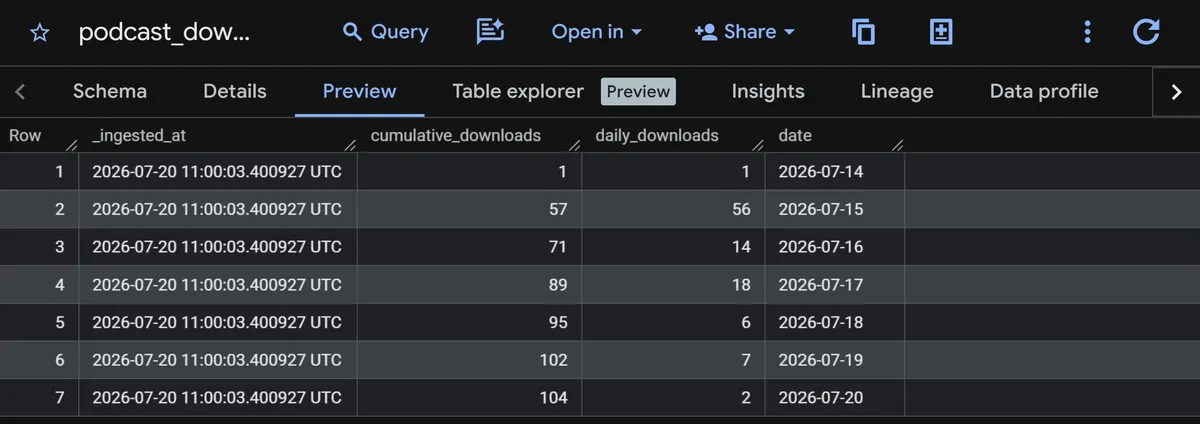
What I wanted was two BigQuery tables - downloads by date and total per-episode metrics. This should update automatically every six hours, and have a Slack message alerting me if anything breaks. In hindsight, this was a pretty trivial build with Claude!
Unpicking Substack's API
In general, a platform doesn't need to offer you an API for one to exist. If a website page is showing numbers, chances are it's fetching those numbers over an API. An API we can also call.
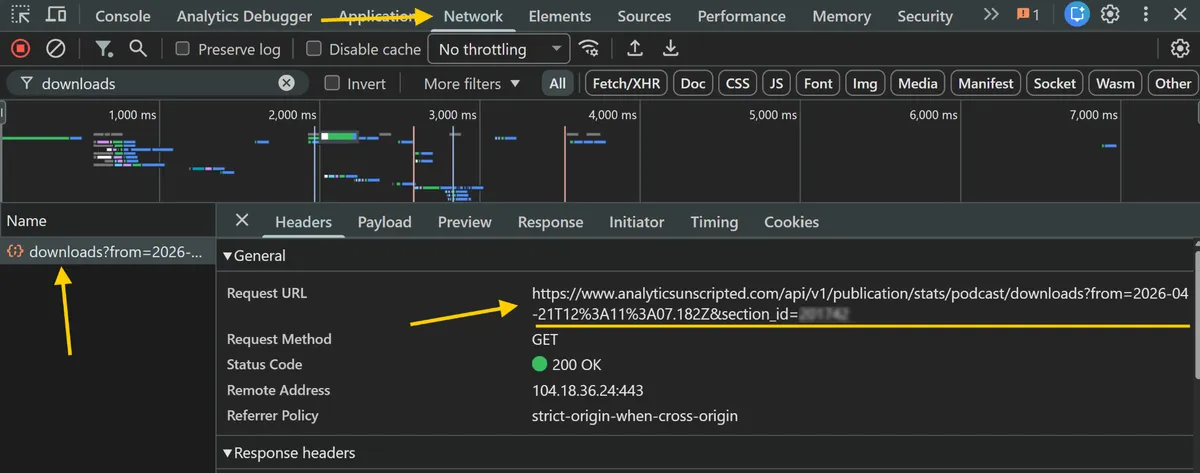
In Substack, open your dashboard, then head to the podcast section in the nav (/publish/podcasting/s/episodes). Then open dev tools, go to the Network tab, and refresh the page. For my needs, the two API requests I want are the downloads (daily and cumulative downloads), and podcast (per-episode metrics).
And yes, this would work on any Substack API i.e. your main blog posts stats too!
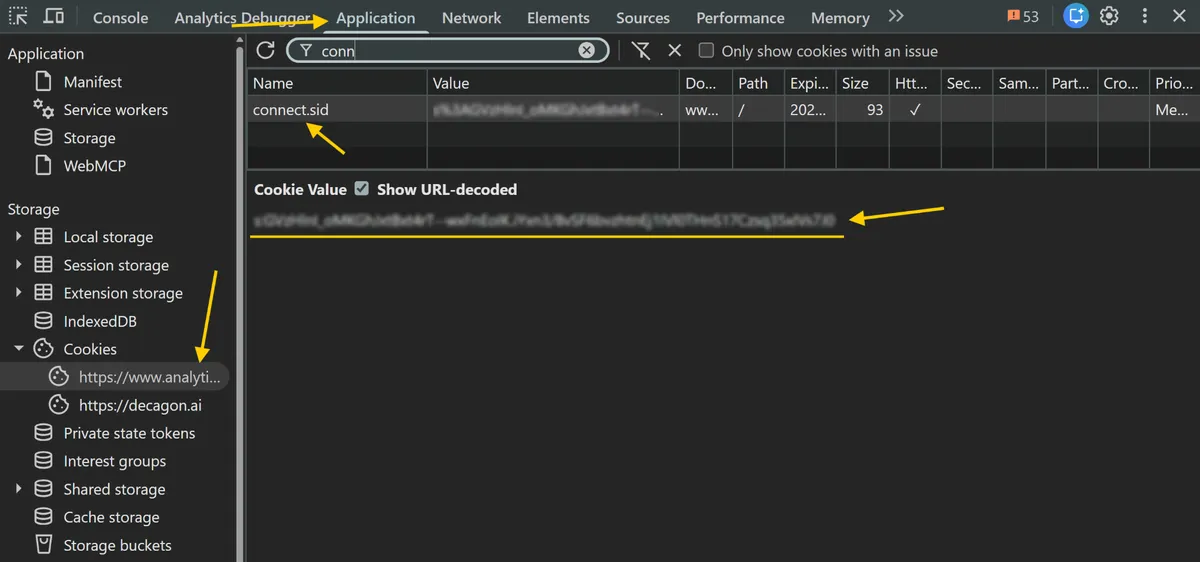
Auth is handled via the connect.sid cookie, which is set when logged in on Substack. Copy its value, attach it to the same request from somewhere else, and the server hands over the JSON. No keys, OAuth or anything fancy. I found out about this cookie from Paweł Huryn who wrote about it here. Thanks Paweł! 🖖
Note: All of this is unofficial and undocumented, so Substack can rename a field or change the auth whenever they like and the pipeline falls over. This is fine for my own needs, but make sure you're okay with it before building anything yourself.
The build
- Cloud Function (Python) - fetches the two endpoints, loads them into BigQuery.
- Cloud Scheduler - runs the function every six hours.
- Secret Manager - where the cookie value lives (so it's never in the code).
- BigQuery - the destination.
- Cloud Monitoring - alerting if anything falls over. I added a Slack destination for these alerts for convenience.
Every run fully replaces each table, so no incremental or merge logic to handle, which is nice and simple.
Throughout the process however, I did come across a few things I needed to solve for:
- The page-size trap. The per-episode endpoint is paginated, and asking for a big page returns a flat 400 error. No docs means no table of limits, so instead of hard-coding a magic number the code starts at a sensible page size and halves it until the server stops failing.
- The "-" problem. Substack uses the string "-" for "no data yet". BigQuery infers column types from the data, so one stray "-" turns a number column into text. I converted them to proper NULLs before loading.
- The empty response. The downside of full-replace is that if the API hiccups and returns nothing, a blind reload wipes a perfectly good table. So if an endpoint comes back empty, I skip the load entirely and trigger an alert.
- The cookie expiry. One day these API calls will fail when/if the cookie value expires. There's no clever fix for this, just grabbing another cookie value from the browser. It does throw an error and an alert on the back of it though, so I'll know when/if it happens.
Build it yourself
You'll need a Google Cloud project with billing switched on (it runs in the free tier and rounds to pennies a month), a Substack podcast you're logged into, and Slack if you want alerts.
The entire build - code, console walkthrough, gotchas, alerting - is packaged into a guide you can hand to Claude Code/Cowork. Just download the substack-bigquery-pipeline-guide.md and attach it to a Code/Cowork session with this prompt:
I want to build a data pipeline that pulls my Substack podcast analytics into
Google BigQuery, refreshing every 6 hours, with Slack alerts when it breaks.
I've loaded the build guide into this session - please follow it and walk me
through the whole thing step by step in the Google Cloud console, explaining as
we go. I'm new to this, so keep it clear and check in before anything
irreversible.

Start by asking me for my Google Cloud project ID, my Substack publication URL
and podcast section_id, my podcast's launch date, my preferred region, and
whether I want Slack alerts. Never hard-code my cookie anywhere - it goes in
Secret Manager.
It reads fine as a plain walkthrough too, if you'd rather do it by hand.